Get your intake hours back.
We connect Clio, Lawmatics, Google Workspace and Claude so matter opening and first drafts stop eating your day. Everything is a draft until an attorney signs off.
- Matter opened in ClioEstate planning, flat fee
- Engagement letter draftedSaved to the matter
- Welcome email in DraftsWaiting for approval
- Your data never trains a modelAnthropic's API terms keep your client data out of model training.
- A lawyer approves everythingDrafts only. Nothing is filed or sent to a client without sign-off.
- Nothing sends on its ownEmails are saved as drafts. No automatic client or court contact.
- You own what we buildRunbooks and a system map are included, so your staff can run it without us.
Built for a specific kind of firm.
If this is you, the scoping call will be worth the hour.
- 1 to 5 attorneysSmall enough that the paralegal and the attorney both touch every matter.
- Estate planning or probateWills, trusts, powers of attorney, administrations. Repeatable documents from repeatable intake.
- Clio or Lawmatics, plus Google WorkspaceIf you run something else, say so on the call and we will tell you plainly whether it fits.
How a matter moves.
- 1Automatic
Lead arrives
A website form, a Lawmatics lead or a phone message lands on one intake screen.
- 2Paralegal
Confirms the facts
Checks the details once. Nothing runs until she confirms.
- 3Automatic
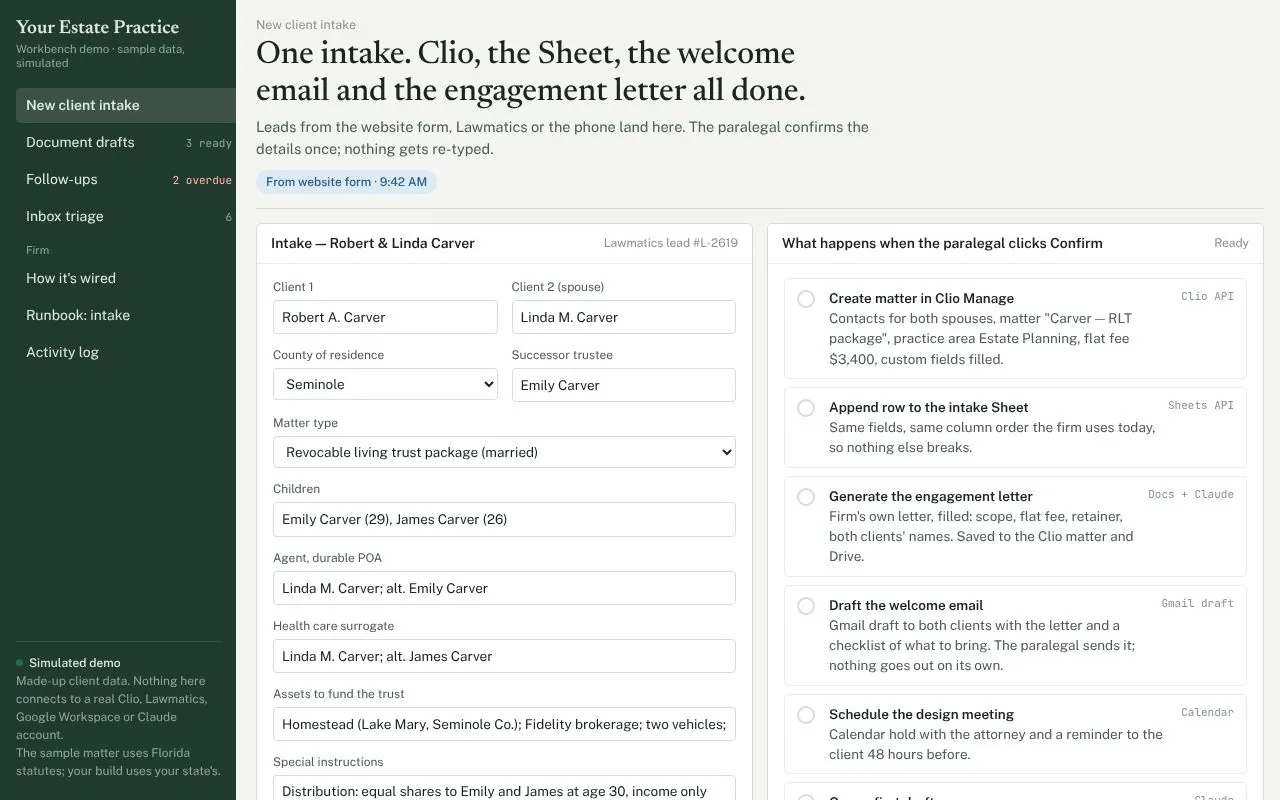
Seven steps run
- Matter and contacts in Clio
- Intake log updated
- Engagement letter filled
- Welcome email drafted
- Meeting and reminder set
- First drafts queued
- Follow-up clock started
- 4Attorney
Reviews and signs
Approves every draft, signs and sends. Nothing leaves the firm without this step.
billed in the average lawyer's day (Clio Legal Trends)
of intake paperwork at 8 matters a month, 75 minutes each (example)
of outputs wait for attorney or paralegal review
scoping call, plus a two-page memo you keep either way
One intake, before and after.
A typical estate-plan intake, from the client form to a first draft ready for attorney review.
Today
- Re-key the intake form into the template
- Chase missing details by email
- Format the draft and check names, dates, fiduciaries
- Log notes and update the matter
With the workflow
- Intake fills the template automatically
- Missing items flagged and request drafted
- Paralegal reviews, attorney approves
- Matter notes logged for you
Illustrative scenario, not a client result. Actual time depends on your intake and templates, and we measure it with you on the scoping call.
Four places a small estate practice loses billable time.
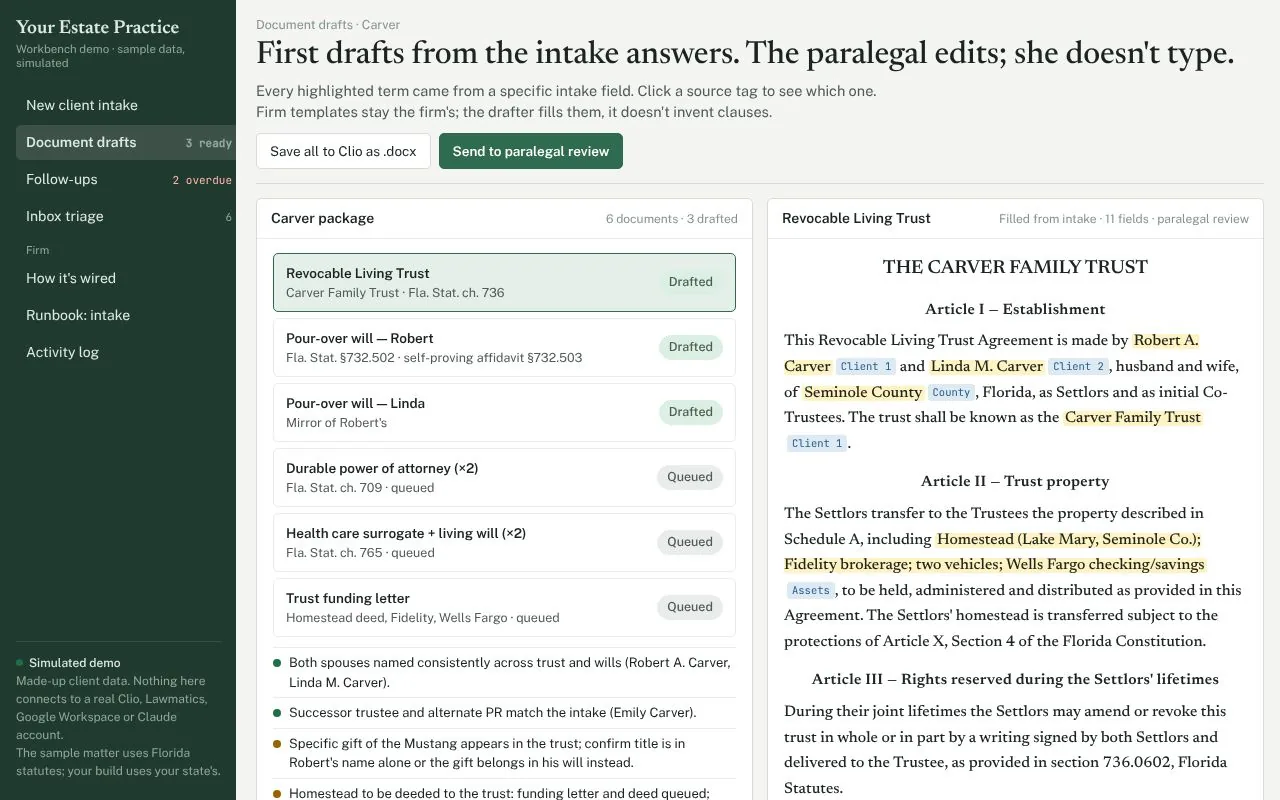
Your forms, populated. Your judgment, preserved.
Article IV. Successor Trustee. Upon the death, resignation or incapacity of both Settlors, Emily CarverSuccessor trustee shall serve as Successor Trustee.
Article VI. Residuary trust. Divided into equal separate shares for the Settlors' children, Emily and James CarverChildren, outright upon attaining age thirty (30)Special instruction.
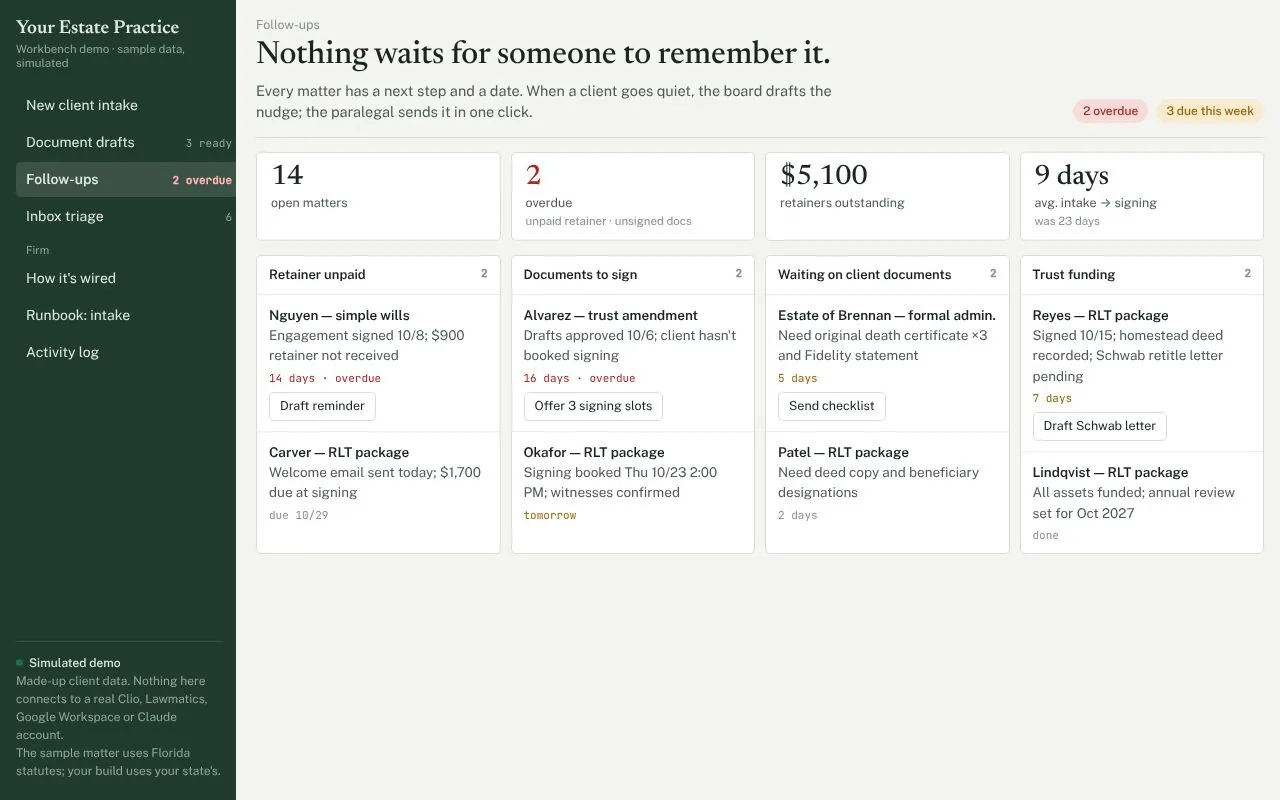
Fewer unreturned documents and unpaid retainers.
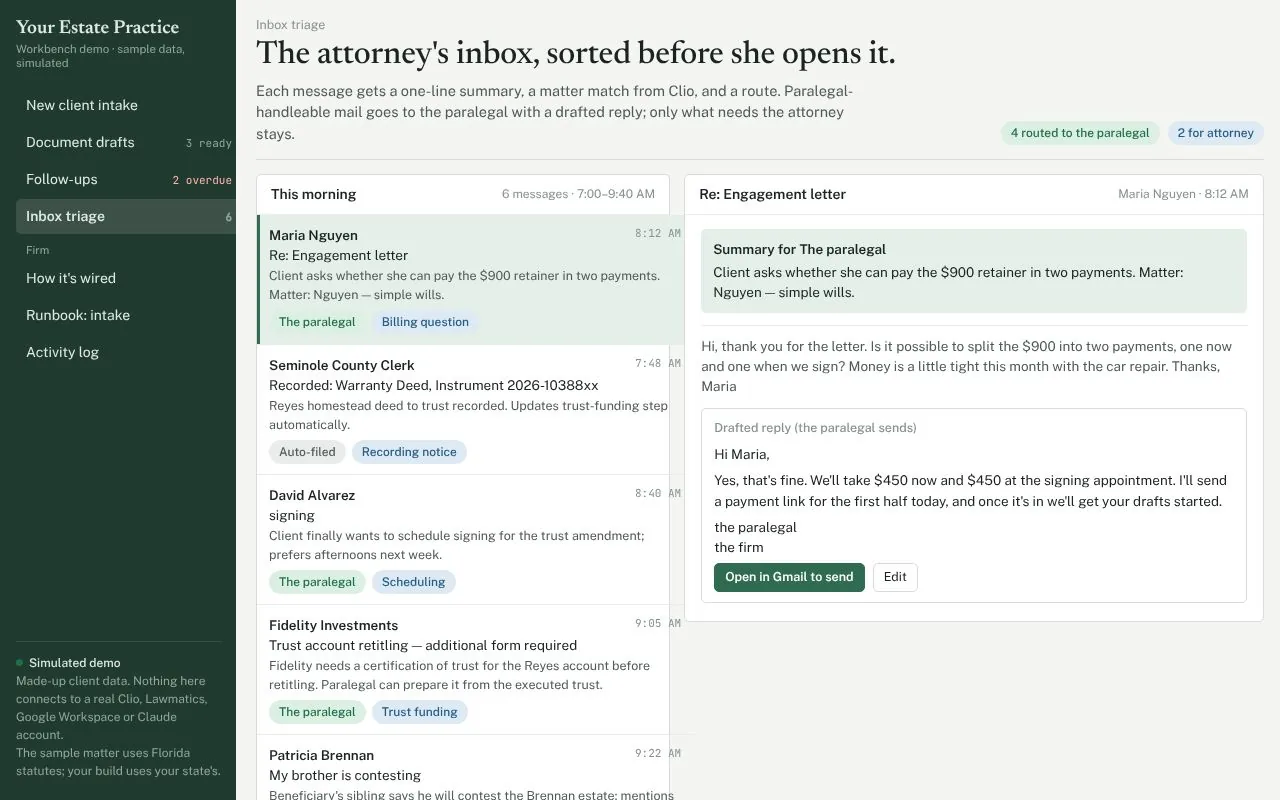
The attorney reads what needs an attorney.
See Sable Law working before you read another proposal.
Real screens from the demo, with made-up client data.
One screen. The paralegal confirms, and the seven steps on the right run.
Open the live demoWhere client information sits, and who touches it.
Not legal advice. Sable Labs is a software consultancy, not a law firm.
- Confidences stay in your accounts
No consumer chat product and no third-party AI portal.
- Zero data retention by arrangement
A separate arrangement available through Anthropic, on top of the no-training terms. A few API features aren’t covered by it, so we confirm which ones a build uses before we start.
- An audit trail per matter
Who did what, and what the model produced. Exportable for your malpractice carrier.
- Least privilege access
Each integration gets only the access it needs. Credentials live in your accounts, never in a prompt.
Attorney review and supervision do not move to software. Read the ABA announcement of Formal Opinion 512 on generative AI, and check your state bar's own guidance.
The first three firms get the build at no cost.
Sable Law is new, and the fastest way to prove it is to run it inside real practices. Three founding firms get the full build free, keep everything, and hold a founding rate for life.
The complete build for your estate planning or probate firm: intake, drafting, follow-ups and inbox triage wired to your tools, at no charge. Runbooks and the system map are yours, so your staff can run it without us.
One scoping call, access to sample or redacted data, and candid feedback while it runs. Afterwards, a short case study that you review and approve, line by line, before anything is published.
A founding rate, locked for life, on support and any future build. Three spots across estate and personal injury; when they are taken, this section comes down and the fixed-fee quote applies.
The free scoping call, minute by minute.
Sample or redacted data only.
- 0–10
Intake today. A real intake, start to finish.
- 10–25
Templates. What comes from intake, what needs the attorney.
- 25–35
Inbox. One morning, sorted together.
- 35–45
Follow-ups. How you find out a client went quiet.
- 45–60
Access. Who owns each workflow after handoff.
Within 48 hours: a two-page memo with what to fix first and a fixed quote. Keep it either way.
Who you would be working with.
A small software studio that builds AI systems for document-heavy work. Three systems from the same studio.
Federal solicitations in, compliant response packages out.
See the service →Bookings, per-aircraft cost, crew logs and documents for private aviation operators.
Intake, drafting, follow-ups and inbox, wired to Clio, Lawmatics and Google Workspace.
See the demo ↑- Documents in
- Cross-checked
- Drafts out
- A person signs
Short answers to the questions that come up on calls.
Written for the attorney who has to decide, not for other engineers.
What ABA Opinion 512 means for a two-attorney firm
The ABA's Standing Committee on Ethics issued Formal Opinion 512 on July 29, 2024. It is the first formal ABA guidance on generative AI, and it is short enough to read in one sitting. For a small estate practice it comes down to four things.
- Know what the tool does (Rule 1.1). You do not need to understand the model. You need to know what goes in, what comes out, and where it fails. Our handoff includes a one-page system map for exactly this reason.
- Confidentiality and consent (Rule 1.6). Client information entered into a tool that learns from it, or that a vendor can read, needs the client's informed consent. We only use Claude through the API on your firm's own account, which is not used for model training, and we document the data path so you can decide what, if anything, to tell clients.
- Tell clients how the work gets done (Rule 1.4). The opinion ties AI use to the duty to consult clients about how you pursue their objectives. Many firms add one sentence to the engagement letter. We can suggest a starting draft for you to review, but the wording is yours.
- Bill for the review, not the time you saved (Rule 1.5). The opinion's own example: a lawyer may bill the 15 minutes spent entering facts and the time spent reviewing the draft, but cannot bill the hours a draft would have taken by hand. A flat-fee practice sidesteps most of this, which is one reason Sable Law suits estate work.
None of this is legal advice, and your state bar may have added guidance since. Read the ABA's announcement and check your state bar before you decide anything.
What we check before touching a Clio account
The first hour of any build is not building. It is reading how the firm already works, because every automation inherits the habits underneath it. Here is the list we work through, in order.
- Who owns the accounts. The Clio subscription, the Google Workspace admin and the Lawmatics login should belong to the firm, not to an employee or to us. If a departed paralegal still owns the Workspace, we fix that before anything else.
- How matters are numbered and named. We match whatever convention the firm uses today. A workflow that invents its own numbering breaks the filing cabinet.
- Which custom fields are real. Most Clio accounts have fields nobody fills in. We find the five or six that staff actually use, and the workflow writes only to those.
- Where the templates live and who last edited them. If the engagement letter exists in three versions, we pick one with the attorney and retire the others before the workflow fills it.
- Who approves what. We write down, in plain words, which outputs the paralegal can release and which need the attorney. That list becomes the approval step inside the workflow.
- Least access. Each integration gets only the permissions its job needs, and credentials stay in the firm's own accounts. We never hold a master password.
- How to turn it off. Before go-live, the paralegal switches the workflow off and back on without us. If she cannot, we are not done.
Most of this is decided on the scoping call. It is also why the memo you get afterwards can include a fixed quote: by then, there are no surprises left in the account.
How we time an intake on the scoping call
The savings calculator on this page uses example inputs. The number that matters is yours, and we get it in about ten minutes at the start of the call.
- Pick one real intake from the last month. A routine one, not the hardest. Sample or redacted data is fine.
- Walk it from first contact to opened matter, naming each person who touched it and each place the same facts were typed: the intake form, Clio, the spreadsheet, the engagement letter, the welcome email.
- Count the re-keying. The number of times the client's name, matter type or fiduciaries were typed by hand is usually the whole story. Four or five is typical.
- Add the waiting. Days between consultation and signed engagement letter, and how the firm found out when a client went quiet.
- Put a time on it, using the paralegal's estimate, not ours. We write that number into the memo as the baseline, and the same intake is timed again after the build.
That before-and-after figure is the only number we quote back to you. If the baseline turns out to be small, we say so on the call and you keep the memo.
Questions attorneys ask.
The ones we hear first. Anything else, send it with your booking email.
Does AI make legal decisions?
No. AI fills your templates and drafts from your intake. A paralegal reviews every output and an attorney approves and signs. Legal judgment stays with the lawyer.
Do we need client consent to use this?
That is a question for your firm and your state bar. ABA Formal Opinion 512 discusses when informing clients is appropriate. We can show you exactly what data goes where, so your decision is informed.
Can anything reach a client or a court on its own?
No. Emails are saved as drafts and documents are saved to the matter for review. Approval steps are part of the workflow.
Which tools does it work with?
Clio (Clio Manage), Lawmatics, Google Workspace and Claude. If your firm uses something else, raise it on the scoping call and we will say plainly whether it fits.
How is it priced?
For the first three founding firms, nothing: see the Founding Program. After that, a fixed fee for the build, quoted in writing in the memo after the free scoping call. No hourly billing. Any third-party app subscriptions a workflow needs are billed separately and listed in the memo.
Who runs it after the build?
Your staff. The handoff includes runbooks and a system map so your paralegal can run it and change it without us.
Are you a law firm?
No. Sable Labs is a software consultancy. We do not give legal advice, and the firm's professional duties stay with the firm.
Book the free one-hour scoping call.
Bring one real intake and one real inbox morning. We map them together and see whether we are of value to your firm.
- A live walk-throughYour intake, templates, inbox and follow-ups, using sample or redacted data.
- A two-page memo within 48 hoursWhat to fix first, and a fixed quote in writing.
- Yours to keepIf you do not go forward, you keep the memo.
cdelgado@sablelabs.techEmail is the best way to reach us.